


Hi Folks,
Nice to see you again, This section will explain the new feature in Windows 8 Operating systems.
Why Windows 8?
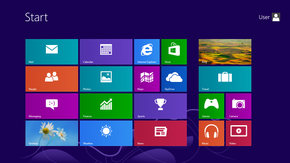
Windows 8 is the best operating system. It has lot of new feature and Better user interface. User can see the all latest updates (Messaging , mail, Facebook,etc) in start menu tiles.
Features: Whats New in Windows 8: Windows 8 features a new lock screen, which includes a date and time display, along with the ability to display notifications from apps.(Lock your computer the you can see this(Win+L)) User accounts can be linked to a Microsoft account to provide additional functionality, such as the synchronization of user data,Xbox Live, Xbox Music, Xbox Video (for gaming and multimedia) and SkyDrive online storage.

Internet explorer 10: Windows 8 ships with Internet Explorer 10, which can run as either a desktop program with full screen mode. and it has inbuilt flash player.
Next We will discuss about the task manager:
What is new in task manager: User can the which software is using how much resource What are the apps are loaded in Startup User can disable the Startup apps.
Windows store:
Windows 8 introduces a new style of application.
Windows Store apps. Apps can run either in a full-screen mode, or be docked to the side of a screen. hey can provide notifications and a "live tile" on the Start screen for dynamic content. Windows Store apps run within a new set of APIs known as the Windows Runtime.
Secure boot: Windows 8 supports a feature of the UEFI specification known as "Secure boot", which uses a public-key infrastructure to verify the integrity of the operating system and prevent unauthorized programs such as bootkits from infecting the device. Now a days all Laptop manufacturing company is manufacturing 64bit machine only.
Nice to see you again, This section will explain the new feature in Windows 8 Operating systems.
Why Windows 8?
Windows 8 is the best operating system. It has lot of new feature and Better user interface. User can see the all latest updates (Messaging , mail, Facebook,etc) in start menu tiles.
Features: Whats New in Windows 8: Windows 8 features a new lock screen, which includes a date and time display, along with the ability to display notifications from apps.(Lock your computer the you can see this(Win+L)) User accounts can be linked to a Microsoft account to provide additional functionality, such as the synchronization of user data,Xbox Live, Xbox Music, Xbox Video (for gaming and multimedia) and SkyDrive online storage.

Internet explorer 10: Windows 8 ships with Internet Explorer 10, which can run as either a desktop program with full screen mode. and it has inbuilt flash player.
Next We will discuss about the task manager:
What is new in task manager: User can the which software is using how much resource What are the apps are loaded in Startup User can disable the Startup apps.
Windows store:
Windows 8 introduces a new style of application.
Windows Store apps. Apps can run either in a full-screen mode, or be docked to the side of a screen. hey can provide notifications and a "live tile" on the Start screen for dynamic content. Windows Store apps run within a new set of APIs known as the Windows Runtime.
Secure boot: Windows 8 supports a feature of the UEFI specification known as "Secure boot", which uses a public-key infrastructure to verify the integrity of the operating system and prevent unauthorized programs such as bootkits from infecting the device. Now a days all Laptop manufacturing company is manufacturing 64bit machine only.


0 comments:
Post a Comment